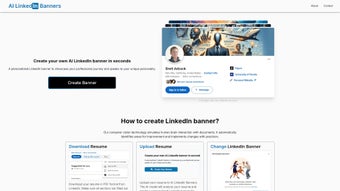

Download AI LinkedIn Banners – Create Custom LinkedIn Banners Fast, Free & Secure
Overview
In the modern professional landscape, a LinkedIn profile is more than a digital résumé – it is a personal brand hub that can open doors to new opportunities, partnerships, and career advancement. First impressions on LinkedIn are formed in seconds, and a compelling background banner can instantly convey credibility, expertise, and personality. AI LinkedIn Banners is a web‑based, AI‑driven application that transforms a traditional resume into a high‑resolution, custom‑designed LinkedIn banner.
By simply uploading a PDF, DOCX, or plain‑text resume, the platform’s computer‑vision and natural‑language processing engine extracts key achievements, industry‑specific terminology, and visual cues. It then assembles a banner that aligns with the user’s career narrative, all while maintaining strict data‑privacy standards. The service is affordable, operates on any modern browser, and requires no installation, making it a perfect tool for job seekers, recruiters, freelancers, and senior executives who want to enhance their online presence without spending hours in a graphics editor.
This review provides an in‑depth look at the core features, real‑world usage, system compatibility, and the pros and cons that matter most to busy professionals.
Key Features & Benefits
- AI‑Driven Resume Analysis: Scans uploaded resumes, identifies headline achievements, and extracts industry‑specific terminology.
- Automatic Visual Theme Matching: Selects color palettes, icons, and layout styles that reflect the professional sector.
- Multiple Format Support: Accepts PDF, DOCX, and plain‑text files up to 5 MB.
- One‑Click Download: Provides finished banners in 1584 × 396 px PNG or JPEG, ready for immediate upload.
- Customizable Text Overlays: Users can edit headline, tagline, or contact information before finalizing the design.
- Secure Cloud Processing: All resume data is encrypted during upload, processed in a transient environment, and deleted after banner generation.
- Affordability: Single‑use licenses under $10; subscription option for unlimited creations.
- Regular Updates: Monthly AI model training ensures alignment with the latest design trends and LinkedIn UI changes.
These features translate directly into tangible benefits for the end‑user. The AI‑driven analysis eliminates the guesswork of choosing appropriate visual elements, while the automatic theme matching guarantees a professional look that resonates with industry standards. Because the platform works entirely in the cloud, users enjoy cross‑device flexibility—whether they are on a Windows laptop at the office, a macOS desktop at home, or a smartphone on the go. The customizable text overlay empowers even non‑designers to add a personal touch, and the secure processing pipeline addresses common privacy concerns associated with uploading sensitive resume data. Finally, the pricing model offers a low barrier to entry, making high‑quality LinkedIn branding accessible to students, mid‑career professionals, and senior executives alike.
Installation, Usage & Compatibility
AI LinkedIn Banners is delivered as a pure web application, which means there is no traditional installation process. Users can start creating a banner in under three minutes by following a straightforward workflow:
- Visit the Official Site: Go to ai-linkedin-banners.com and click the prominent “Create Your Banner” button.
- Upload Your Resume: Drag‑and‑drop a PDF, DOCX, or .txt file, or use the file selector. Files up to 5 MB are accepted.
- AI Processing (≈30 seconds): The engine parses the document, extracts sections such as “Professional Summary,” “Core Skills,” and “Career Highlights,” then converts those insights into visual components.
- Preview & Edit: A live preview appears. Users can modify headlines, adjust color schemes, or add a tagline using intuitive sliders and text boxes.
- Download the Banner: Once satisfied, click “Download.” The banner is saved in high‑resolution PNG or JPEG format.
- Upload to LinkedIn: In LinkedIn, navigate to “Add profile section” → “Background Photo,” and upload the new banner. Your profile instantly looks more polished and personalized.
The platform is built on responsive web technology and works across all major operating systems and browsers. Minimum requirements include:
- Desktop: Windows 10 or later, macOS 11 (Big Sur) or later, Linux distributions with a recent kernel.
- Mobile: Android 9+ (Chrome) or iOS 13+ (Safari).
- Browser: Latest versions of Chrome, Firefox, Edge, or Safari with JavaScript enabled.
- Internet: Stable broadband or 4G/5G connection (minimum 5 Mbps recommended for fast AI processing).
Because the entire workflow runs in the cloud, no additional plugins, extensions, or local software installations are required. Users can access the tool from any computer, tablet, or smartphone with an internet connection, making it ideal for remote workers and frequent travelers. For those who need to create multiple banners over time, the subscription plan stores previous resumes (encrypted) for quick regeneration whenever a profile refresh is needed.
Pros, Cons & Frequently Asked Questions
Pros
- Rapid banner creation – typically under one minute after upload.
- AI intelligently aligns visual design with professional content.
- Affordable pricing with both one‑off and subscription options.
- Full privacy – resumes are encrypted and deleted after processing.
- Cross‑platform compatibility – works on Windows, macOS, Linux, Android, and iOS.
- Easy customization without needing graphic‑design expertise.
Cons
- Limited to LinkedIn banner dimensions; not a full‑suite graphic design tool.
- Requires an internet connection; offline use is not possible.
- AI suggestions may occasionally need manual tweaking for niche industries.
- Free tier offers only one banner per month; heavy users need a paid plan.
Frequently Asked Questions
Is my resume data safe when I upload it?
Yes. All uploads are encrypted with TLS 1.3 during transit and processed in a temporary sandbox. The file is automatically deleted from the server within 30 minutes of banner generation.
Can I use the tool on a mobile device?
Absolutely. The responsive interface works on iOS and Android browsers, allowing you to upload a resume and download a banner directly from your phone or tablet.
What file formats are accepted for resume uploads?
PDF, DOCX, and plain‑text (.txt) files are supported. PDFs retain original formatting, while DOCX files are parsed for headings and bullet points.
How many banners can I create with the free version?
The free tier allows one banner per month. If you need multiple designs or frequent updates, the paid subscription offers unlimited creations.
Do I need any graphic‑design skills to edit the banner?
No. The editor provides drag‑and‑drop text boxes, pre‑set color palettes, and instant preview, so anyone can personalize the banner without prior design experience.
Conclusion – Elevate Your LinkedIn Profile Today
A well‑crafted LinkedIn banner is a low‑effort, high‑impact way to differentiate yourself in a crowded job market. AI LinkedIn Banners delivers that advantage with a blend of smart AI, user‑friendly design tools, and robust privacy safeguards—all at a price that fits most professional budgets. Whether you’re a recent graduate looking for that extra edge, a mid‑career professional seeking a brand refresh, or a senior executive aiming to reinforce thought‑leadership, the platform’s quick turnaround and cross‑device accessibility make it a worthwhile investment. Click the button below to start creating a banner that tells your career story at a glance, and watch your profile engagement rise.
Overall Rating: 4.5/5
Pros: Fast AI generation, secure handling, affordable pricing.
Cons: Limited free usage, internet‑only.



.png)



